Why Is This Dependency Here?
Use Bomly CLI to trace why a package is in your dependency graph, then add license, vulnerability, and Scorecard context for review.
To find out why a dependency is in your project, run bomly explain <package> from the repo root. Bomly resolves the dependency graph, finds the package, and prints the path or paths that introduced it. Add --enrich when you also want license and vulnerability metadata.
This is useful for the small mystery every dependency reviewer knows: a package appears in a lockfile, nobody remembers choosing it, and the answer is somewhere in the graph. It may be direct, transitive, pulled in through multiple routes, or present only because another tool dependency brought it along.
If you work in Go, this may sound similar to go mod why. That is intentional. But explain is not Go-specific: it takes the same useful question — “why is this dependency here?” — and answers it across every ecosystem Bomly supports, including npm, PyPI, Maven, Cargo, and more (see the full support matrix). On top of the paths, it adds optional license, vulnerability, reachability, and OpenSSF Scorecard context. The Go example below is just one ecosystem; the same command shape works for a package in any supported project.
Start with the package name
Name the package you want to trace. Here Bomly is pointed at its own repository — github.com/go-git/go-git/v5 is a Go dependency of the Bomly CLI, on a version with known advisories — so a single command shows both sides of a review at once: the paths that introduced the package and the advisories attached to it.
bomly explain github.com/go-git/go-git/v5 \
  --url https://github.com/bomly-dev/bomly-cli \
  --ref 665d347 \
  --enrich -q
--enrich runs Bomly's enabled matchers for external package metadata, such as license and known advisories. In Bomly CLI 0.16.0, that command reports:
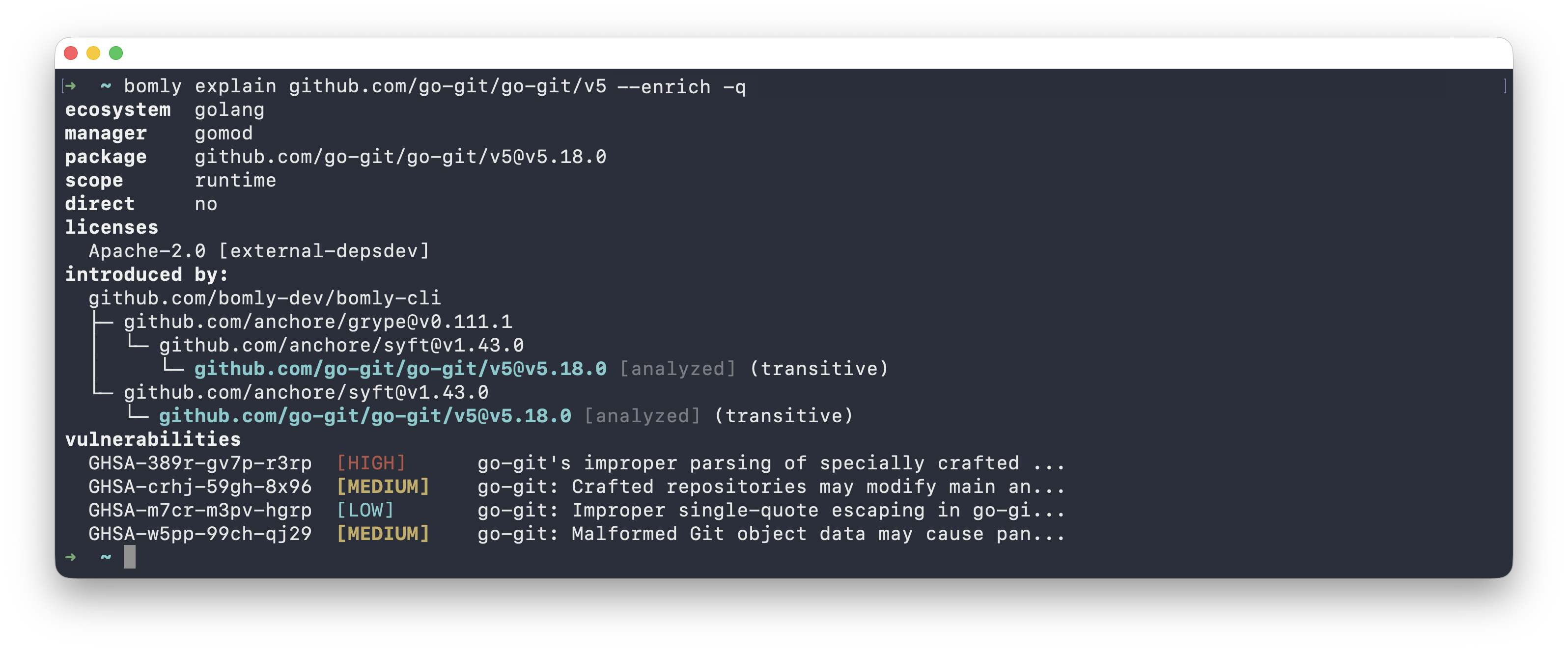
The important part is the shape. Bomly traces every path that pulls the package in — not just whether it is listed in go.mod — and, because enrichment found advisories, prints the vulnerable version, license, and advisory IDs alongside those paths. That answers the review question directly: why is it here, and does it matter?
Read the impact section
For a review artifact, ask for Markdown. Add --analyze to run reachability analysis and --matchers +scorecard to opt into the OpenSSF Scorecard matcher — it is not in the default enrichment set because it adds one lookup per unique GitHub repository:
bomly explain github.com/go-git/go-git/v5 \
  --url https://github.com/bomly-dev/bomly-cli \
  --ref 665d347 \
  --enrich \
  --analyze \
  --matchers +scorecard \
  --format markdown -q
Impact Assessment

- Vulnerabilities: 4
- Policy findings: none
- Licenses: 1
- Project posture: 9.5/10  github.com/go-git/go-git  (updated 2026-07-07, scorecard v5.3.0)
- Reachability: 4 analyzed (4 unreachable)

| Severity | ID | Reachability | Fixed In | Exploitability | Source |
| --- | --- | --- | --- | --- | --- |
| HIGH | GHSA-389r-gv7p-r3rp | unreachable (package) | 5.19.0 | risk 0.0 | grype |
| MEDIUM | GHSA-crhj-59gh-8x96 | unreachable (package) | 5.19.1 | risk 0.0 | grype |
| LOW | GHSA-m7cr-m3pv-hgrp | unreachable (package) | 5.19.1 | risk 0.0 | grype |
| MEDIUM | GHSA-w5pp-99ch-qj29 | unreachable (package) | 5.19.1 | - | grype |
Now the report also carries a Scorecard result for the upstream repository (a 9.5/10 project posture) and a reachability column for each advisory.
Reachability is still experimental. Symbol-level reachability is currently supported for Go when the advisory and govulncheck data support it; other ecosystems are currently less precise. Treat reachability as triage context, not as proof that a package is safe or unsafe. If a vulnerable package is present, decide whether to update, investigate further, or document why it is acceptable in your project.
For automation, use JSON and select the fields you need:
bomly explain github.com/go-git/go-git/v5 \
  --url https://github.com/bomly-dev/bomly-cli \
  --ref 665d347 \
  --enrich \
  --analyze \
  --matchers +scorecard \
  --json -q |
  jq '.targets[0].dependency | {
    name,
    version,
    licenses: [.licenses[] | {value}],
    vulnerabilities: [.vulnerabilities[]? | {id, severity}],
    scorecard: {
      repository: .scorecard.repository,
      aggregateScore: .scorecard.aggregateScore,
      runDate: .scorecard.runDate
    }
  }'
That gives you the same data in a shape a script can consume:
{
  "name": "github.com/go-git/go-git/v5",
  "version": "v5.18.0",
  "licenses": [
    {
      "value": "Apache-2.0"
    }
  ],
  "vulnerabilities": [
    {
      "id": "GHSA-389r-gv7p-r3rp",
      "severity": "high"
    },
    {
      "id": "GHSA-crhj-59gh-8x96",
      "severity": "medium"
    },
    {
      "id": "GHSA-m7cr-m3pv-hgrp",
      "severity": "low"
    },
    {
      "id": "GHSA-w5pp-99ch-qj29",
      "severity": "medium"
    }
  ],
  "scorecard": {
    "repository": "github.com/go-git/go-git",
    "aggregateScore": 9.5,
    "runDate": "2026-07-07T12:53:48Z"
  }
}
What explain is good for
Use bomly explain when you need to answer a narrow question:
- Why is this package here?
- Is it direct or transitive?
- Which parent packages introduced it?
- What license and vulnerability context is attached to this package?
- What reachability context is available for the finding?
- Does the upstream GitHub repository have Scorecard data?
Use bomly scan when you want the whole graph, bomly diff when you want to review what changed between two states, and --json or Markdown output when another tool needs to consume the result. The nice part is that you do not have to start with the whole graph. You can start with the one package that made you ask, "why is this here?"