Make Your Coding Agent Dependency-Aware
Connect Bomly's MCP server to Claude Code, Cursor, or VS Code so your coding agent can scan, explain, and diff dependency changes from inside the repo.
Make your coding agent dependency-aware by registering Bomly as an MCP server, then adding a repo instruction that tells the agent when to call it. The agent can ask Bomly for a dependency scan, an explanation for why a package exists, or a diff of what changed before it commits a dependency update.
That matters because dependency changes are easy to make and surprisingly easy to under-review. A one-line package bump can pull a lot of new graph behind it.
What problem this solves
Coding agents can edit manifests and lockfiles quickly. That is useful, but it also means they can change dependency state before they understand the graph they just touched.
Without that context, the feedback loop tends to arrive late. The agent introduces a vulnerable version, the local edit keeps moving, and the issue shows up later in CI, or later still on the default branch if that is where dependency checks run.
MCP moves the dependency check into the moment where the agent is already changing the files. The agent gets a local tool it can call from inside the repo, and Bomly returns structured dependency data the agent can reason over.
WarningMCP is not an enforcement mechanism. It gives the agent local context while the files are still in front of it, but it does not prove the dependency change is good or replace review. For a required pull-request gate, use Bomly Guard. For the local agent loop, MCP keeps the dependency question close to the edit.
Install Bomly CLI
On macOS or Linuxbrew, install Bomly with Homebrew:
brew install bomly-dev/tap/bomly
bomly version
For WinGet, Scoop, Linux packages, install scripts, and checksum notes, use the installation guide.
The MCP server is built into the same bomly binary. Your MCP client launches it with:
bomly mcp serve
Add Bomly as an MCP server
Add Bomly to the MCP client your agent already uses. Project-scoped configuration is usually the right starting point because the dependency workflow belongs to the repo.
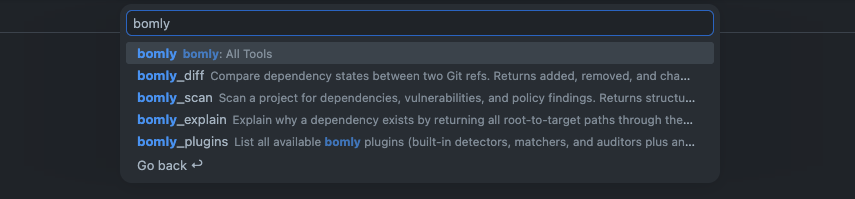
An MCP-aware agent can see Bomly's tools alongside its other local tools.
Claude Code project config
Create or update .mcp.json in the repo:
{
  "mcpServers": {
    "bomly": {
      "type": "stdio",
      "command": "bomly",
      "args": ["mcp", "serve"],
      "env": {}
    }
  }
}
Claude Code prompts before using project-scoped servers from .mcp.json. Use /mcp inside Claude Code to inspect the connection and available tools.
Claude Code CLI
If you prefer the Claude Code CLI, this command writes the same server entry:
claude mcp add --transport stdio bomly -- bomly mcp serve
Cursor project or user config
Create or update .cursor/mcp.json in a project, or ~/.cursor/mcp.json for your user:
{
  "mcpServers": {
    "bomly": {
      "type": "stdio",
      "command": "bomly",
      "args": ["mcp", "serve"],
      "env": {}
    }
  }
}
Then open Cursor's MCP settings and confirm that the Bomly server is enabled. If Cursor cannot start the server, run bomly mcp serve in a terminal from the same environment Cursor uses.
VS Code workspace or user config
Create or update .vscode/mcp.json in a workspace, or your user MCP config:
{
  "servers": {
    "bomly": {
      "type": "stdio",
      "command": "bomly",
      "args": ["mcp", "serve"]
    }
  }
}
Use the command palette action MCP: List Servers or MCP: Open Workspace Folder MCP Configuration to inspect the server.
Tell the agent when to use it
MCP gives the agent the tool. Repo instructions tell it when the tool matters.
Add a small section to CLAUDE.md, AGENTS.md, or the instruction file your agent reads:
## Dependency changes

Before committing a change to a dependency manifest or lockfile
(package.json, lockfiles, go.mod, requirements.txt, and similar):

1. Use the `bomly_diff` tool with `enrich: true` to compare this branch
   against the base ref for the change, such as `main` or the branch
   merge base.
2. If the diff reports introduced vulnerability findings, do not commit.
   Tell me what was found and propose a version without known advisories.
3. Note the diff result in the commit message.
Treat this as a starter instruction. Tune it for your repo by naming the exact files that count as dependency changes, setting the base ref your team uses, or asking the agent to run bomly_explain when it does not understand why a package is present.
NoteUse
enrich: truefor vulnerability-aware dependency checks. It lets Bomly include advisory, license, lifecycle, and package metadata when those matchers are enabled, and it can call external data sources. Some detectors also call the ecosystem build tool to resolve the graph, and those tools may contact package registries depending on cache state and project setup. The detector network behavior docs have the detailed breakdown.
Check that the server starts
Run the server directly once to verify the binary and PATH before opening the agent:
bomly mcp serve
You should see the server start and list the tools it exposes:
Starting Bomly MCP server (stdio) ...
Registered tools:
  bomly_scan     Scan and get compact, remediation-grouped findings.
  bomly_explain  Dependency paths, advisories, and fix context for one package.
  bomly_diff     Security delta between two Git refs.
  bomly_plugins  List registered Bomly plugins.
Awaiting client on stdio ...
Press Ctrl-C to stop it. In normal use, Claude Code, Cursor, or VS Code launches the server for the tool call.
Next steps
Open your agent in the repo and ask it to describe the dependency graph, explain one package, scan the project for vulnerabilities and fix any findings, or check a dependency edit before committing. If the answers are useful, keep the repo instruction. If they are noisy, make it narrower.
The full MCP workflow, including additional client configs and tool details: